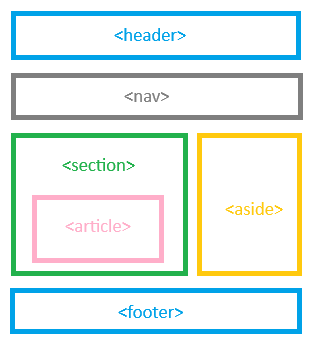
HTML Layout Elements help you structure a web page in a meaningful and organized way. They define different sections of your page, such as header, navigation bar, main content area, and footer.
Before HTML5, developers used <div> tags for everything. Now, HTML5 introduced semantic layout elements that make code more readable and SEO-friendly.
Common HTML Layout Elements
Below are the most important HTML5 layout tags and their uses
| Element | Description |
|---|---|
| <header> | Defines the top section of a webpage or a section often contains the logo, title, or navigation menu. |
| <nav> | Defines navigation links (menus or lists of links). |
| <section> | Defines a thematic grouping of content, typically with a heading. |
| <article> | Represents an independent piece of content (like a blog post or news article). |
| <aside> | Defines content related to the main content (like sidebars or ads). |
| <main> | Specifies the main content area unique to the page. |
| <footer> | Defines the bottom section often includes copyright info, links, and contact details. |
HTML Layout Example
Here’s a simple example of a complete webpage layout using HTML5 semantic tags,
<!DOCTYPE html>
<html lang="en">
<head>
<meta charset="UTF-8">
<meta name="viewport" content="width=device-width, initial-scale=1.0">
<meta name="description" content="Learn how to create a webpage layout using HTML5 layout elements like header, nav, section, and footer.">
<meta name="keywords" content="HTML layout elements, HTML5 structure, header, footer, article, section, semantic HTML tutorial">
<meta name="author" content="Web Tutorials">
<title>HTML Layout Elements Tutorial</title>
<link rel="stylesheet" href="style.css">
</head>
<body>
<header>
<h1>My Website</h1>
<p>Welcome to HTML Layout Tutorial</p>
</header>
<nav>
<a href="#home">Home</a> |
<a href="#about">About</a> |
<a href="#services">Services</a> |
<a href="#contact">Contact</a>
</nav>
<main>
<section>
<h2>About HTML Layout</h2>
<p>HTML layout elements give structure to your webpage and improve SEO readability.</p>
</section>
<article>
<h2>Why Use Semantic Elements?</h2>
<p>They help browsers, developers, and search engines understand your page’s content better.</p>
</article>
<aside>
<h3>Related Links</h3>
<ul>
<li><a href="#">HTML Tags List</a></li>
<li><a href="#">HTML Forms Tutorial</a></li>
</ul>
</aside>
</main>
<footer>
<p>© 2025 MyWebsite. All rights reserved.</p>
</footer>
</body>
</html>HTML layout elements can be seen in a graphic structure below,