If you’re starting your journey in web development, learning HTML is a good place to begin. HTML (HyperText Markup Language) provides the basic structure of web pages and works together with CSS and JavaScript to create modern websites.
If you’re new to coding, setting up a development environment can sometimes feel confusing. Professional code editors such as Visual Studio Code offer many useful features, but beginners may prefer a simpler way to start writing and testing HTML.
You can use an online HTML compiler to write, edit, test, and preview your HTML code directly in a web browser. There is no need to install a desktop code editor or configure a development environment just to test a small HTML example. You can open the editor, enter your code, run it, and view the result in the preview.
An online HTML compiler can be useful for students learning HTML, college assignments, beginners practicing web development, and developers who want to test a quick code snippet.
In this guide, we’ll explain how to use an online HTML compiler, what the main features do, and how you can use the editor to write and test HTML, CSS, and JavaScript.
What Is an Online HTML Compiler?
An online HTML compiler is a browser-based coding environment that lets you write HTML, CSS, and JavaScript in one place and view the result directly in your browser without installing a desktop code editor.
Unlike a traditional desktop code editor, an online HTML compiler runs through your web browser. Depending on the tool, it may provide features such as a code editor, live preview, code formatting, and responsive device previews in the same workspace.
As you write and change your code, the editor runs the page and displays the result in the preview area. This makes it easier to see how HTML, CSS, and JavaScript work together.
Instead of switching between different applications, you can write your code, test the result, make changes, and preview the updated page from the same browser window.
Our HTML Online Compiler Interface
The HTML Online Compiler is designed with a clean, distraction-free interface so you can focus entirely on writing and testing your code.
When you open the editor, you’ll notice that the workspace is divided into two main sections.
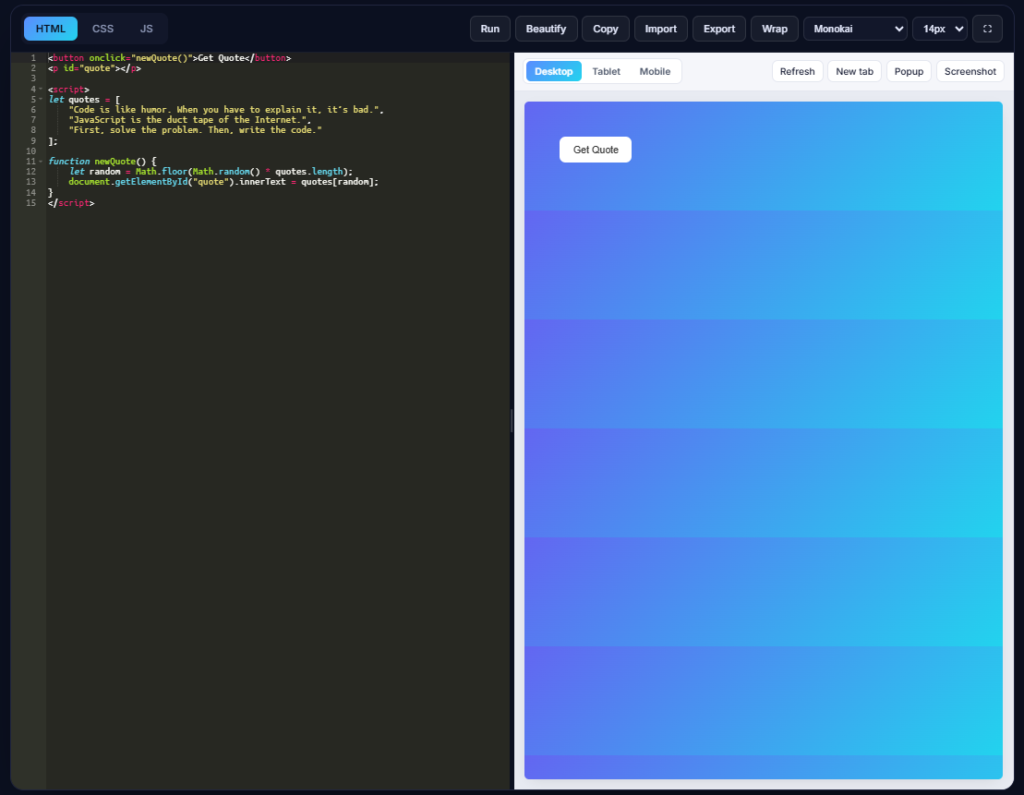
Code Editor (Left Panel)
The left side contains a powerful syntax-highlighted code editor where you can write your HTML, CSS, and JavaScript.
Different colors are used for tags, attributes, functions, variables, and text, making the code easier to read and helping you identify mistakes more quickly.
At the top of the editor, you’ll find dedicated tabs for HTML, CSS, and JavaScript, allowing you to organize your project just like in a professional code editor.
Live Preview Panel (Right Panel)
The right side displays your webpage exactly as it will appear in a browser.
Instead of guessing whether your code is correct, you can instantly verify your design, layout, buttons, colors, fonts, and interactive elements.
The preview panel also includes responsive viewing options, allowing you to test how your webpage looks on desktop, tablet, and mobile screens without leaving the editor.
This makes it much easier to build responsive websites from the beginning.
Who Should Use This HTML Compiler?
An online HTML compiler can be useful for people with different levels of web development experience.
It can be especially useful for:
- Students learning HTML for the first time
- Beginners practicing HTML, CSS, and JavaScript
- Teachers demonstrating HTML examples in class
- Developers testing HTML, CSS, and JavaScript snippets
- Bloggers creating and testing HTML widgets
- Freelancers creating simple webpage layouts and landing pages
- Designers experimenting with webpage layouts
- Anyone who wants to practice coding without installing a desktop editor
Whether you’re creating your first webpage or testing a small HTML component, an online compiler gives you a convenient place to write your code and preview the result in your browser.
How to Use HTML Online Compiler?
Using the HTML Online Compiler is simple, even if you’re a beginner. Just write or paste your code into the editor and click the Run button. Your output will appear instantly in the Live Preview panel on the right, allowing you to test and debug your code without installing any software.
The compiler gives you the flexibility to work in the way that suits you best. If you prefer keeping your project organized, you can write your HTML, CSS, and JavaScript separately by using their dedicated tabs. Simply add your page structure in the HTML tab, your styles in the CSS tab, and your scripts in the JS tab. When you click Run, the compiler automatically combines all three files and displays the final result.
If you already have a complete HTML document, there’s no need to separate your code. You can paste everything into the HTML tab, including your CSS inside the <style> tag and your JavaScript inside the <script> tag. The compiler fully supports this approach, so your project will run just like it would in a normal .html file.
Whenever you make changes, simply click Run again to refresh the preview. If you want to improve the readability of your code, use the Beautify button. You can also Copy your code, Import an existing HTML file from your computer, or Export your project for future use. The Wrap option makes long lines easier to read by preventing horizontal scrolling.
To test how your webpage looks on different devices, switch between the Desktop, Tablet, and Mobile preview modes. You can also use Refresh to reload the preview, New Tab to open your project in a separate browser tab, Popup for a distraction-free preview window, or Screenshot to capture your webpage with a single click.
Whether you’re practicing HTML, building a complete webpage, testing CSS animations, or experimenting with JavaScript, the HTML Online Compiler provides a fast and convenient way to write, edit, and preview your code directly in your browser.
Why Beginners Love HTML Online Compiler
An online HTML compiler brings the code editor and live preview together in one browser window. This means you can write your HTML, add CSS or JavaScript, run the code, and check the result without switching between different applications.
For beginners, this can make practicing web development more straightforward. You can start with a simple HTML example, make changes, and immediately check how those changes affect the webpage.
It can also be useful when experimenting with a new layout or building a small personal webpage. Instead of spending time setting up a development environment for a simple test, you can use the browser-based editor to write and test your code.
Conclusion
Learning HTML becomes easier when you can write code and see the result as you practice. An online HTML compiler lets you create HTML, add CSS and JavaScript, run your code, and view the result directly in your browser without installing a desktop code editor.
It can be useful for students learning HTML, beginners practicing web development, teachers demonstrating examples, and developers testing small code snippets. Features such as Beautify, Import, Export, responsive preview, theme options, and full-screen editing can also make the coding and testing process more convenient.
If you’re learning HTML, start with a simple webpage and experiment with different elements, styles, and JavaScript interactions. Make changes, run the code, and use the preview to see how your code affects the page.
You can use an online HTML compiler to practice HTML, CSS, and JavaScript directly in your browser and build your understanding one example at a time.