When you open a website, you expect its main content to appear within a few seconds. Maybe you are reading a blog post, looking at a product, or using an online tool. If the main content takes too long to show up, you may feel that the website is slow, even if the rest of the page has already started loading.
This is where Largest Contentful Paint (LCP) comes in.
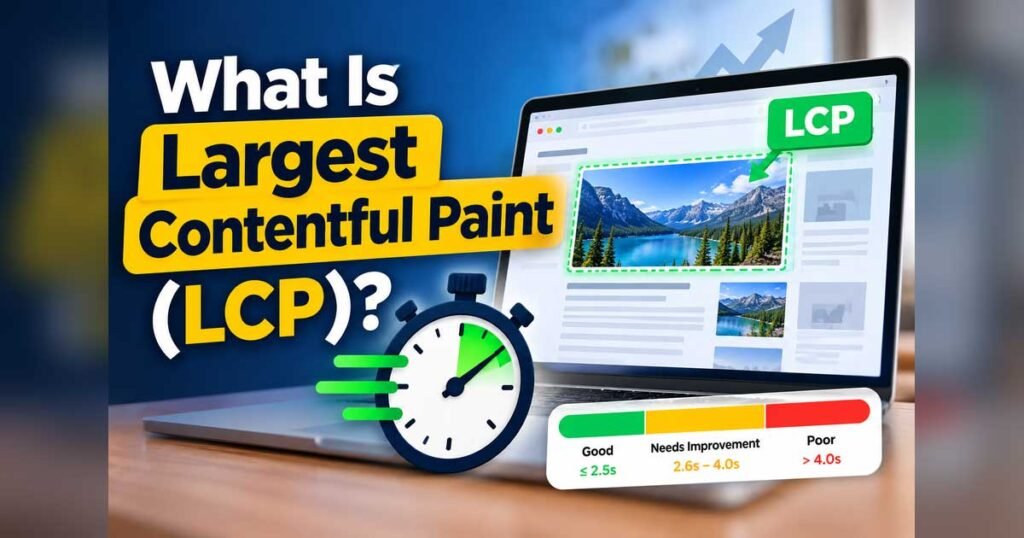
LCP measures how long it takes for the largest visible image or text block to appear on a webpage. It is one of Google’s Core Web Vitals metrics and helps you understand whether the main content is loading quickly enough for visitors.
A slow LCP can happen for different reasons. A large image, a slow server, or resources that delay page rendering can all affect how quickly the main content appears. Finding the actual cause makes it easier to decide what needs to be fixed.
In this article, we will look at what Is Largest Contentful Paint?, how LCP works, which elements affect it, what counts as a good LCP score, and how to check your website’s performance using available tools.
What Is Largest Contentful Paint?
Largest Contentful Paint (LCP) measures how long it takes for the largest qualifying image or text block on the visible part of a webpage to appear on the screen.
The initial viewport is simply the part of a webpage you can see before scrolling down.
For example, imagine opening a blog post. The menu and background may appear quickly, but the main heading or featured image takes a little longer to load. LCP measures when the largest eligible content element in that visible area appears.
This helps you understand how quickly visitors can see the main content of your page.
LCP does not measure how long it takes for the entire website to finish loading. It focuses on the largest eligible content element visible on the screen, so you can understand whether the most important part of the page appears quickly.
The LCP element can also vary from one page to another. On one page, it might be a large heading, while on another, it could be a featured image. The result can also change depending on the screen size and how the page content is displayed.
What Is Largest Contentful Paint in SEO?
Think about opening a website to read a tutorial. You click the link, and the page starts loading. At first, you might see only the background or a few parts of the layout. After a short wait, the main heading or featured image appears.
As a visitor, you probably care more about when you can start reading than when the page finishes loading completely.
That is what makes LCP useful. It helps you understand how quickly the main content appears on the screen. If it shows up quickly, the website feels faster. But if you have to wait several seconds to see it, the page may feel slow, even if other parts have already loaded.
This is one reason why checking LCP can help you find website speed problems. It shows whether the main content is appearing on time, rather than just telling you that the page has started loading.
Which Elements Are Counted as LCP?
Not every element on a webpage can become the Largest Contentful Paint element. The browser considers specific types of content that occupy a significant portion of the visible screen.
These commonly include images, video poster images, and large blocks of text.
1. Images
Images are common LCP elements because they often occupy a large part of the initial screen.
For example, a blog website might display a wide featured image directly below the navigation bar. If that image is the largest eligible element in the initial viewport, it may determine the page’s LCP.
The image’s size, loading priority, and the time it takes to download can all influence the result.
2. Large Text Blocks
Text can also be responsible for LCP.
Consider a page with a large heading that introduces a tutorial. If the heading is the largest qualifying content element in the visible area, the browser may use it for the measurement.
This is one reason LCP is not only an image optimization metric. Text rendering can also be affected by slow server responses, render-blocking stylesheets, and font-loading behavior.
3. Video Poster Images
Some webpages display a video player near the top of the page. Before the video begins playing, the player may show a poster image.
That poster image can qualify as an LCP element.
For example, an educational website may display a large video thumbnail above the lesson description. If the thumbnail is the largest eligible content element, it can affect the page’s LCP result.
The exact element depends on how the video is implemented and which content is visible when the page loads.
What Is Not Usually Counted as LCP?
LCP does not simply select the largest item of any kind on a webpage.
Small icons, decorative borders, background colors, and many other interface elements do not qualify as LCP content.
For example, a navigation icon may appear before the main article heading, but its small size means it is unlikely to be the LCP element.
Similarly, a large empty container does not automatically become the LCP element just because it occupies a lot of space. The browser looks at qualifying content rather than measuring the largest blank area.
CSS background images also require special attention because their eligibility and rendering behavior differ from ordinary HTML image elements. Depending on the implementation, an image used as a CSS background may qualify under the relevant browser rules.
The important point is that LCP focuses on qualifying content, not every visible part of the page.
What Is a Good LCP Score?
A good LCP score means the main content appears within a reasonable amount of time.
Google recommends the following thresholds:
| LCP Time | Rating | Meaning |
|---|---|---|
| 2.5 seconds or less | Good | The main content appears quickly |
| More than 2.5 seconds up to 4 seconds | Needs Improvement | The loading experience could be better |
| More than 4 seconds | Poor | Visitors may experience noticeable delays |
These thresholds are useful when checking your website’s performance.
For example, if your article page has an LCP of 1.9 seconds, it meets the good threshold. If the result is 3.4 seconds, you should investigate why the main content takes longer to appear.
Google generally evaluates Core Web Vitals using real-user data at the 75th percentile. This means the assessment considers the experiences of visitors rather than relying only on one laboratory test.
Mobile and desktop experiences are assessed separately, so a good desktop result does not automatically mean that your mobile pages are performing well.
How Does Largest Contentful Paint Work?
When you open a webpage, the browser has to do several things before the content appears on your screen.
It first requests the page from the server and receives the HTML. Then, it processes the page, loads the required resources, and prepares the content to be displayed.
LCP measures when the largest qualifying content element in the visible part of the page appears on the screen.
Let’s understand this with an example.
Suppose you open a blog post that has a large featured image at the top. The browser starts loading the page and then downloads the image. Once the image is ready to be displayed, it appears on the screen.
If this image is the largest qualifying element in the initial viewport, its display time can determine the LCP score.
But sometimes, the image takes longer to appear. The server might respond slowly, the image file might be too large, or the browser might discover the image later than expected because it is loaded through a stylesheet or JavaScript.
Even after downloading the image, the browser may need additional time before it can display it.
This is why two websites with a similar design can have very different LCP scores. The difference often comes down to how quickly their main content is loaded and displayed.
What Is the Difference Between LCP and Page Load Time?
LCP and total page load time are related, but they measure different things.
Page load time is often used informally to describe how long a page takes to load its resources or reach a particular browser event. The exact meaning depends on the tool or measurement being used.
LCP focuses specifically on when the largest qualifying content element in the initial viewport appears.
For example, a webpage may display its main heading and featured image in 2 seconds, while a tracking script or an image near the bottom of the page finishes loading several seconds later.
In that situation, LCP may still be good even though some resources continue loading.
The reverse can also happen. A page may begin downloading resources quickly, but the main image may not appear until much later. That can result in a poor LCP score.
This distinction helps you focus on the loading experience that visitors notice first.
Why Is Largest Contentful Paint Important for SEO?
LCP is one of the three Core Web Vitals, along with Interaction to Next Paint (INP) and Cumulative Layout Shift (CLS).
These metrics cover different aspects of the user experience:
- LCP looks at how quickly the main content appears.
- INP evaluates how responsive a page is to user interactions.
- CLS measures unexpected layout shifts during the page’s lifetime.
LCP is relevant to SEO because Core Web Vitals form part of Google’s page experience considerations.
However, having a perfect LCP score does not guarantee that your website will rank at the top of search results. Google considers many factors when ranking pages, including relevance, content quality, and how well the page satisfies the searcher’s needs.
A fast website is valuable because it helps visitors reach the content they came for. It should be treated as one part of a broader website quality strategy rather than a shortcut to higher rankings.
For bloggers and website owners, the best approach is to publish useful content and make sure that the important parts of the page are available without unnecessary delays.
What Causes a Poor LCP Score?
A poor result can have several different causes. Identifying the actual problem is more useful than applying the same optimization to every page.
Slow Server Response
The browser cannot begin processing the initial HTML until it starts receiving the server’s response.
If the server takes too long to respond, the entire loading process may be delayed. This can happen because of slow application processing, inefficient database queries, missing caching, or network delays.
Large Images
A large image can take longer to download, particularly on a mobile connection.
If the featured image determines LCP, its file size and dimensions can have a direct effect on when it appears.
Late Image Discovery
Sometimes the browser does not discover the main image early enough.
This can happen when the image is loaded through CSS or inserted into the page by JavaScript after the initial HTML has been processed.
In such cases, the download may begin later than necessary.
Render-Blocking Resources
Certain stylesheets and scripts can delay the browser from rendering the main content.
If the browser must process unnecessary resources before displaying the largest content element, LCP may increase.
Font Loading Delays
When the LCP element is text, font-loading behavior can affect when that text becomes visible in its intended form.
Using a suitable fallback font and avoiding unnecessary font files can help reduce delays.
The right solution depends on which of these issues affects your page. A performance report can help you narrow down the possibilities.
How to Check LCP for Your Website
You do not need advanced programming knowledge to start checking your website’s LCP score.
Several tools can help you understand how your pages perform.
Google PageSpeed Insights
PageSpeed Insights is a convenient starting point for website performance testing.
Open the tool, enter the URL of your webpage, and run the analysis.
The report provides information about Core Web Vitals, performance opportunities, and possible reasons for loading delays. When sufficient real-user data is available, you can also compare field data with laboratory test results.
Check mobile and desktop separately. If your mobile result is poor, review the recommendations and look for information about the LCP element.
You can test individual article pages as well as your homepage.
Google Search Console
Search Console provides a Core Web Vitals report that can help you identify groups of URLs with similar performance problems.
For example, several article pages may use the same template and featured-image layout. If these pages have poor LCP results, the shared template may be worth investigating.
The report is based on real-user data where available, so it provides a different perspective from a single laboratory test.
Chrome DevTools
Chrome DevTools is useful when you need to investigate a specific page in greater detail.
Its Performance panel can help you inspect page loading, resource activity, and rendering behavior. Depending on the browser version and available trace data, you may be able to identify the LCP element and examine the events leading up to its appearance.
This is particularly useful when the performance report identifies a problem but does not make the cause obvious.
LCP on Mobile vs. Desktop
Your website can have different LCP results on mobile and desktop devices.
Desktop computers often have more processing power and may use faster internet connections. Mobile visitors may be browsing over cellular networks or using devices with more limited resources.
The page layout can also change according to the screen size.
For example, a desktop page might display a wide banner, while the mobile version displays a different image or places the heading above it. As a result, the LCP element may be different on the two versions.
This is why website owners should not rely on desktop testing alone.
Check your mobile performance, especially if your website receives a significant amount of traffic from smartphones.
If the mobile result is poor, investigate the actual content being displayed on that screen rather than assuming the desktop optimization will solve everything.
What Is the Difference Between LCP and FCP?
First Contentful Paint (FCP) is another browser performance metric, but it measures a different event.
FCP records when the browser renders the first piece of content from the page, such as text, an image, or certain other qualifying visual content.
LCP records when the largest qualifying content element in the initial viewport is rendered.
Imagine a page where a small logo appears after half a second, but the large article image appears after 3 seconds.
FCP may be recorded when the logo appears, while LCP may be recorded when the larger image appears.
Both measurements are useful. FCP helps you understand when the page first starts showing content, while LCP gives you more information about when the main visible content appears.
A good FCP result does not automatically mean that your LCP score will also be good.
Does LCP Measure the Entire Website?
No. LCP is measured for an individual page view, and its result depends on the content and layout visible in the initial viewport.
Different pages on the same website can have different LCP values.
For example, your homepage may have a large hero image, while a simple article page may begin with a text heading. An online tool page may use a different layout altogether.
Even the same URL can produce different results on different devices because the visible content may change.
This is why you should avoid assuming that every page on your website has the same performance problem.
When testing a website, select representative pages from different templates. That can help you discover whether the problem affects one particular page or a larger part of the website.
How Can You Maintain a Good LCP Score?
Once your important pages meet the recommended threshold, keep checking their performance as your website changes.
Uploading new images, installing plugins, changing the theme, or adding third-party scripts can affect loading behavior.
You do not need to run a full optimization process every day. Instead, test pages after significant changes and review your Core Web Vitals reports regularly.
If a page becomes slower, compare its current behavior with earlier results and look for the change that may have introduced the delay.
For example, if the LCP score worsens immediately after adding a large banner, examine the banner’s dimensions, format, and loading priority.
Making small, measured changes is usually more effective than repeatedly changing unrelated settings.
Now that you understand what Largest Contentful Paint is and how it affects website loading, the next step is learning how to improve it. Read our guide on How to Improve Largest Contentful Paint (LCP) to explore practical ways to reduce loading delays and improve your website’s performance.
Conclusion
Largest Contentful Paint (LCP) helps you understand how quickly the main content of a webpage appears on the screen. It does not measure how long every part of the page takes to load. Instead, it focuses on the largest qualifying content element that visitors can see.
If your LCP score is slow, there could be several reasons behind it. Your server might take too long to respond, the main image could be too large, or the browser might take extra time to find and display the content.
You can start by checking your important pages in PageSpeed Insights. The report can help you find possible problems and understand what needs attention.
When the main content appears sooner, visitors do not have to wait as long to start reading or using your webpage. That is why improving LCP is an important part of making a website feel faster.